Best short-term rentals in Scottsdale for remote work (2026)
Best overall: a rental with an enclosed workspace. Best for walkable downtime: an apartment near your planned outings. Best for keeping the booking brief simple: a compact rental with a dedicated desk. This 2026 guide ranks Scottsdale rental configurations for remote work, so you can choose by working conditions rather than vacation photos.
TL;DR
For the best short term rentals Scottsdale for remote work, prioritize an enclosed workspace and verified internet.
HomeSlice Stays provides luxury vacation rental booking services in Scottsdale and surrounding areas; verify each home's working setup.
Two remote workers need separate call spaces, not just a larger dining table.
A private pool is a leisure feature, not evidence of a work-ready rental.
Why this matters
A vacation rental has to support two different parts of your day: work and time off. A pool, outdoor seating, and attractive interiors tell you little about whether you can finish a presentation without moving your laptop between rooms. Start with the workday. Add leisure features after the essentials pass.
HomeSlice Stays is a Scottsdale vacation rental booking option for travelers seeking luxury accommodation for a work trip. Use HomeSlice Stays to explore the brand's booking services, then ask about the specific property's workspace and internet setup. Luxury accommodation and remote-work suitability are separate questions.
The ranking below compares rental types, not named properties with verified equipment. Each recommendation has a distinct use case, plus the limitation you should resolve before committing. Your best choice depends on your calls, your travel companions, and how much time you will actually spend working inside.
What makes the best rental for remote work?
Use these criteria for your 2026 shortlist before comparing leisure amenities:
Workspace separation: Look for a room with a closing door if calls or focused work require privacy. Confirm that using it will not displace another guest.
Internet evidence: Request a recent test from the actual work location. Ask whether the connection is shared and whether the property has known coverage gaps.
Desk usability: Verify the work surface, chair, nearby outlets, and room to position your laptop or equipment. A desk label alone does not answer these questions.
Noise control: Ask about street exposure, shared walls, scheduled maintenance, and activity within the property. Match the answers to your meeting schedule.
Household fit: Count simultaneous workers and sleeping guests separately. A property that sleeps your group does not automatically accommodate everyone's working hours.
Booking clarity: Read the terms for your dates, guest count, visitors, and intended use. Resolve unanswered questions in writing before booking.
Treat missing evidence as an unresolved criterion, not a positive result. You do not need every luxury feature. You do need a clear answer for every condition your job requires.
Scottsdale remote-work rentals at a glance in 2026
1. Rental with an enclosed workspace
Best for: Meeting-heavy solo travelers
Standout feature to verify: A separate room with a closing door
Key limitation: The advertised office still needs equipment and connection checks
2. Apartment near planned outings
Best for: Travelers prioritizing walkable downtime
Standout feature to verify: A suitable desk plus a practical location
Key limitation: Shared walls and street exposure need investigation
3. Compact rental with a dedicated desk
Best for: Solo travelers with light meeting schedules
Standout feature to verify: A clearly defined work area
Key limitation: Limited separation between work and leisure
4. Larger home with separate work zones
Best for: Couples or colleagues working together
Standout feature to verify: Independent spaces for simultaneous calls
Key limitation: Sleeping capacity does not establish workspace capacity
5. Private-pool home with an indoor workspace
Best for: Travelers combining work and leisure
Standout feature to verify: A usable indoor work area alongside recreation
Key limitation: Outdoor amenities can distract from inadequate work facilities
1. Enclosed-workspace rental: best for frequent video calls
A rental with an enclosed workspace gives you a physical boundary between work and the rest of the stay. It is the strongest default for a traveler whose day includes confidential conversations, presentations, or uninterrupted concentration. The room matters more than the property's styling.
Ask whether the workspace is a separate room, a bedroom corner, or an open area described as an office. Those arrangements are not interchangeable. Request a photo showing the full work surface and chair, rather than a close-up that hides the room's layout.
Enclosed-workspace rental pros:
A closing door separates calls from activity elsewhere inside.
A defined room lets you leave work equipment in place.
Physical separation makes it easier to stop working at the end of the day.
Enclosed-workspace rental cons:
An office description does not establish chair comfort or internet quality.
Using a bedroom as an office can conflict with another guest's routine.
A closed door does not prove sound isolation.
Check where the workspace sits relative to bedrooms, living areas, and exterior doors. If you need privacy rather than simply fewer interruptions, ask specifically whether conversations are audible outside the room. Do not interpret a room label as an acoustic claim.
Best for: Solo travelers with frequent meetings or private calls.
Verdict: Buy this configuration when the enclosed room and its working setup are confirmed.
2. Apartment near planned outings: best for walkable downtime
An apartment near the places you intend to visit puts location at the center of the decision. This configuration fits travelers who want to work indoors, then leave the accommodation for meals, errands, or evening plans. Judge proximity against your own itinerary, not a broad neighborhood label.
Check the exact routes to the places you expect to use. A listing's description of a convenient location does not establish that your particular outings are practical on foot. Separately, verify that the apartment has a suitable workspace rather than assuming you will work elsewhere.
Apartment near planned outings pros:
The location can support your specific after-work plans.
A self-contained space gives you a base for working and resting.
The choice keeps attention on the surrounding area rather than unused amenities.
Apartment near planned outings cons:
Shared walls require questions about neighboring activity.
Street-facing rooms need a noise check.
An open-plan layout can leave calls exposed to other guests.
For a 2026 work trip, compare the actual workspace location with the apartment's busiest surroundings. Ask whether the desk faces a shared corridor, street, or living area. If noise is a deal-breaker, get an answer about the specific unit rather than accepting a general description of the building.
Best for: Travelers who prioritize outings after work and do not need a separate office.
Verdict: Hold until the desk, surrounding noise, and intended walking routes are checked.
3. Compact desk-equipped rental: best for a simple solo stay
A compact rental with a dedicated desk narrows the search to the essentials: somewhere to sleep, somewhere to work, and a layout you can use comfortably. It suits a solo traveler who does not need several rooms or extensive recreation space. Compact describes the layout, not a promise about the booking terms.
The dedicated desk should remain available throughout your stay. Ask whether it doubles as the only dining surface or sits in a passageway. If every meal requires packing away your work equipment, the setup is less dedicated than it first appears.
Compact desk-equipped rental pros:
A smaller layout makes the work area easier to assess from clear photos.
A dedicated surface separates laptop use from eating.
The configuration avoids choosing extra rooms you do not need.
Compact desk-equipped rental cons:
The same room can serve as your workspace and relaxation area.
Another guest's presence can reduce call privacy.
Desk placement can restrict room for additional equipment.
Tell the host what you intend to bring, particularly if you use a separate keyboard or monitor. Ask for work-surface dimensions instead of estimating scale from photographs. A visually tidy setup is not proof that your equipment will fit.
Best for: Solo travelers with light meeting schedules and straightforward equipment needs.
Verdict: Buy this configuration when the desk fits your equipment and shared space is not an issue.
4. Larger home: best for simultaneous remote workers
A larger home earns its place when travelers need independent working areas, not merely extra bedrooms. For 2 remote workers, identify 2 separate call spaces before booking. These are planning requirements, not claims about any particular property.
Map each worker's routine onto a room. If both people have calls at the same time, a single dining table does not solve the problem. Each assigned space needs its own usable surface, seating, outlets, and internet coverage.
Larger-home rental pros:
Separate rooms can accommodate different meeting schedules.
Independent work zones keep shared leisure areas available.
The layout can support guests whose working hours do not match.
Larger-home rental cons:
Bedroom count does not prove that suitable desks exist.
Internet coverage needs checking in every proposed work zone.
Shared kitchens and living areas can interrupt nearby calls.
The large-group vacation rental guide addresses a related accommodation need. For a work trip, add a separate workspace review to your group-planning checklist. Enough beds is only the first test.
Ask each traveler to identify non-negotiable working conditions before the group chooses a home. Resolving privacy and schedule conflicts at that stage is better than assigning rooms after arrival.
Best for: Couples or colleagues whose calls overlap.
Verdict: Hold until every simultaneous worker has a confirmed work zone.
5. Private-pool home: best for a work-and-leisure trip
A private-pool home puts recreation alongside your accommodation. It fits a traveler who wants a leisure feature available after working hours. The pool belongs in the leisure assessment; it contributes nothing to the evidence for desk quality, call privacy, or connection reliability.
Assess the indoor workspace first. Outdoor seating is not a substitute for an indoor workstation because sunlight, weather, and background activity change the working conditions. Treat patio work as optional, not as your only plan.
Private-pool home pros:
Recreation can remain part of the stay without being the workspace.
Separate indoor and outdoor areas can support a clear workday boundary.
The configuration suits travelers who value time at the property after work.
Private-pool home cons:
Pool photographs do not establish working conditions.
Outdoor furniture needs a separate suitability check before laptop use.
Pool-related rules and scheduled maintenance require clarification.
Ask where maintenance activity occurs and whether it affects the proposed workspace. Read the property-specific pool rules rather than assuming that private use means unrestricted use. Keep the work and recreation checks separate throughout your shortlist.
Best for: Travelers balancing indoor work with recreation at the rental.
Verdict: Buy only after the indoor workspace passes; skip a pool-first choice with unresolved work essentials.
How the rental types rank
This 2026 ranking prioritizes workspace separation, internet evidence, desk usability, noise control, household fit, and booking clarity. It ranks configurations by their fit for distinct working routines, rather than presenting unsupported scores for individual properties.
The enclosed-workspace rental is the default because it addresses separation directly. The apartment prioritizes location. The compact rental serves a simpler solo brief, while the larger home addresses simultaneous workers. The private-pool home adds recreation after the working conditions are settled.
HomeSlice Stays provides luxury vacation rental booking services, but the provider name alone does not establish any property's remote-work features. Choose the configuration first, then verify the individual rental. That order prevents attractive leisure photographs from answering a question they cannot resolve.
Check the rental before you commit
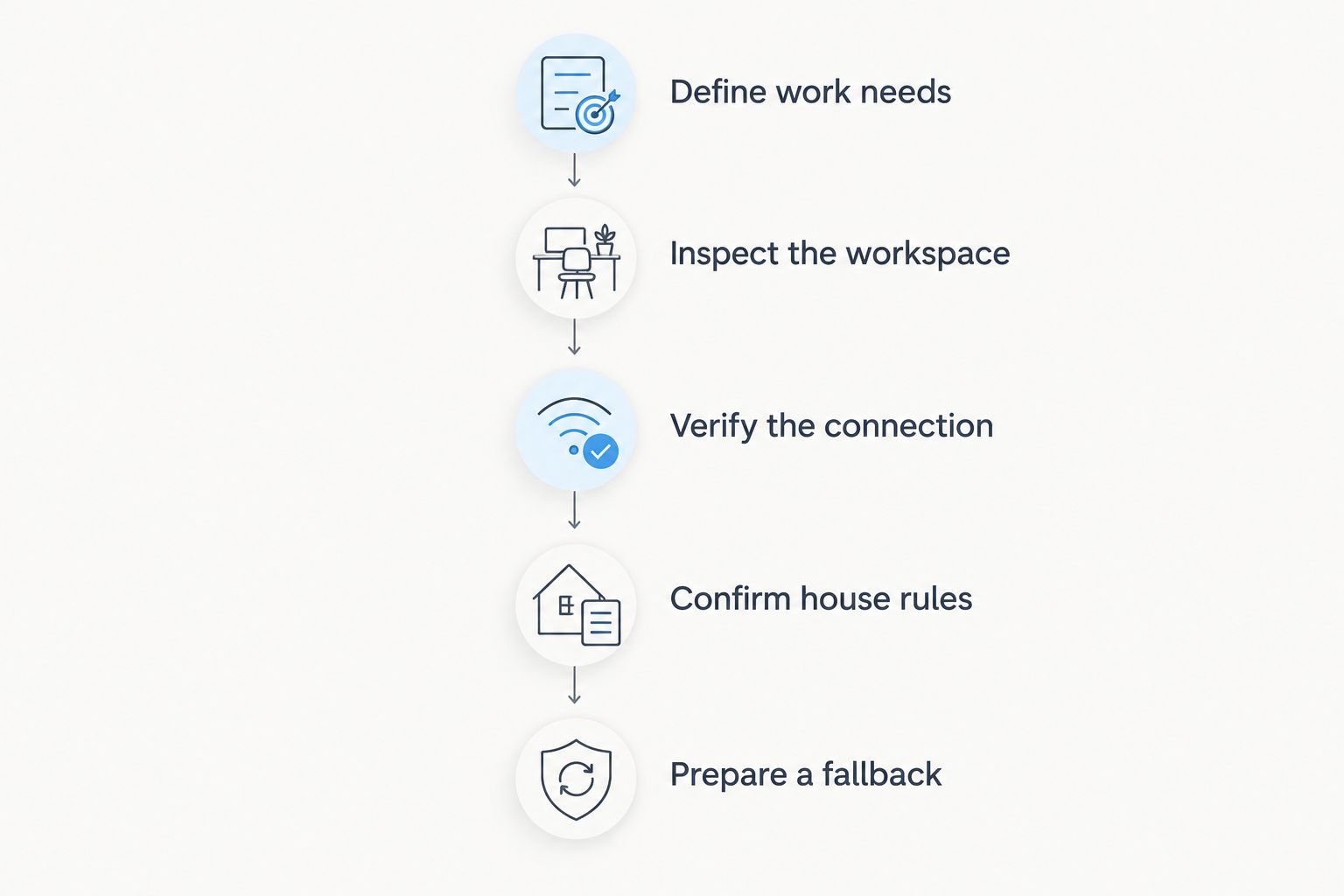
Use this sequence to turn a promising description into a workable booking decision:
Define work needs. List your call schedule, privacy requirements, equipment, and simultaneous workers.
Inspect the workspace. Request current photos of the surface, chair, outlets, and surrounding room.
Verify the connection. Ask for a recent internet test from the proposed work location and clarify known coverage issues.
Confirm house rules. Resolve guest, visitor, arrival, maintenance, and intended-use questions in writing.
Prepare a fallback. Decide what you will do if the connection or workspace does not meet your needs.
Do not substitute an internet test from another room for evidence about your desk location. Likewise, a photograph of an attractive chair does not tell you whether it adjusts or suits your working posture. Ask direct questions about the features that affect your day.
Verify the work setup before letting leisure amenities decide the booking.
After arrival, reserve 30 minutes for a work rehearsal before your first scheduled meeting. Sit at the desk, connect your usual equipment, join a test call, and check the lighting and background. This is a recommended preparation step, not a guarantee of uninterrupted service.
Which rental should you choose?
Choose an enclosed-workspace rental as your default for a 2026 Scottsdale work trip. Move to another configuration only when your routine gives you a clear reason: location for outings, a compact solo setup, separate spaces for colleagues, or recreation after work.
When comparing HomeSlice Stays vacation rentals for remote work, ask property-specific questions before making your choice. A luxury description establishes the accommodation category, not the details of a workstation. Keep the decision tied to written answers and current photographs.
If two rentals both satisfy your work requirements, let your leisure priorities break the tie. If only one satisfies them, choose the work-ready configuration. A trip that includes working hours needs accommodation selected for those hours too.
FAQ
What's the best short-term rental type in Scottsdale for remote work?
A rental with an enclosed workspace is the strongest default for travelers with frequent calls or focused work. Verify the desk, chair, internet connection, and surrounding noise at the individual property before booking.
Does HomeSlice Stays offer Scottsdale vacation rental bookings?
HomeSlice Stays provides luxury vacation rental booking services in Scottsdale, Arizona, and surrounding areas. Ask about the specific rental's workspace and internet setup rather than treating luxury accommodation as proof of remote-work suitability.
Is an apartment better than a house for working remotely?
An apartment is better suited to a location-focused solo trip, while a house with separate work zones fits simultaneous workers. The deciding factors are your workspace requirements, call privacy, and the individual property's layout.
How do I check a rental's internet before booking?
Request a recent internet test from the location where you intend to work. Ask whether the connection is shared, whether coverage varies by room, and what support is available if a problem occurs.
Can two people work remotely from one vacation rental?
Two people can share a work trip when the rental provides suitable spaces for both working routines. If calls overlap, confirm separate call locations with usable surfaces, seating, outlets, and internet coverage.
Should I choose a Scottsdale rental with a private pool?
Choose a private-pool rental when its indoor workspace already meets your needs and you want recreation after work. A pool is a leisure feature, not evidence of desk quality or reliable internet.
What should I ask about a dedicated workspace?
Ask whether the workspace is a separate room or part of another living area. Request current photos and details about the work surface, chair, outlets, lighting, and nearby activity.
One last thing
For your 2026 trip, check what sits behind the desk as carefully as what sits on it. A door, shared passageway, or window can affect your call background and interruptions even when the work surface looks suitable. Request a photo taken from the seated working position, plus a view in the opposite direction. Those views answer different questions.
Book for the workday you actually have, then choose the leisure features you want. Do not reverse that order.
Related guides
More Blogs