Airbnb interior design to first guest booking: 2026 workflow
Instead of manually coordinating furniture deliveries, listing edits, and cleaner updates, use a single launch checklist for Airbnb interior design in Paradise Valley, AZ, so every room is guest-ready before you accept a booking. This 2026 workflow connects your design brief, property checks, listing setup, and first-arrival handoff without treating photography as the finish line.
TL;DR
Airbnb interior design Paradise Valley AZ: finish operational checks before opening your booking calendar.
HomeSlice Stays suits Scottsdale-area owners seeking vacation rental management and booking services.
Approve room layouts, photograph the finished property, then verify the listing against the actual guest experience.
Repeat readiness checks whenever furniture, sleeping arrangements, or advertised amenities change.
Why this matters
A finished-looking rental is not necessarily ready for guests. A bedroom can photograph well while lacking accessible outlets; a beautiful living room can leave the advertised guest group without enough practical seating.
Design approval and booking approval are separate decisions. Your 2026 launch needs both: rooms that work for the intended stay and an operating plan that delivers what the listing promises.
HomeSlice Stays is best for Scottsdale-area owners seeking vacation rental management and booking services. You can start with HomeSlice Stays when deciding who will own the management side of your launch; separately confirm the scope of any design, installation, or photography work.
Before you start
Access and authority: Have owner-approved access to the property, the Airbnb hosting account, and any calendar already accepting reservations. Confirm the property's applicable rental permissions, insurance arrangements, and association restrictions before planning a launch date.
Materials and ownership: Gather room measurements, existing inventory, delivery information, appliance instructions, and a written assignment of responsibilities. Name who approves purchases, accepts installations, checks cleaning, and releases the calendar.
The hidden gotcha: Do not publish a sleeping arrangement simply because furniture fits. Check the property's permitted occupancy and restrictions, then verify that the actual setup supports the guest count you intend to advertise.
Create 1 shared launch brief and keep it current. A spreadsheet or document works; the essential feature is that every person uses the same approved version rather than separate message threads.
Property brief and room configuration
Establish the guest promise
Write the intended stay type in the launch brief: family visit, quiet getaway, or another use the property genuinely supports. Describe needs rather than inventing a guest profile from nearby attractions.
Record the approved guest count, bedrooms, bathrooms, and actual sleeping arrangements. Separate permanent beds from convertible furniture so the listing can describe both accurately.
Measure furniture locations and circulation routes. Check doors, drawers, luggage placement, and access around beds before approving the layout.
Assign each room a purpose and an acceptance condition. A bedroom needs a usable sleeping setup; a dining area needs seating consistent with the stay you advertise.
Expected result: The owner and whoever prepares the property can explain the same guest experience without interpreting a mood board.
Turn the brief into room decisions
Choose finishes and furnishings around use, cleaning, and replacement—not only the listing's lead image. Keep a record of care instructions and replacement details so a damaged item does not become a guessing exercise.
Use this table to decide where an item belongs. These are configuration choices, not promises of higher occupancy or booking performance.
Dedicated sleeping room
Best for: Guests who need a separate bedroom
Practical advantage: Keeps sleeping space separate from shared activities
Trade-off to resolve: Commits the room to that primary purpose
Flexible guest room
Best for: Properties that need a room to serve different uses
Practical advantage: Allows the layout to change between stays
Trade-off to resolve: Requires a tested conversion and accurate listing description
Shared lounge
Best for: Guests spending time together indoors
Practical advantage: Preserves a common gathering area
Trade-off to resolve: Should not be presented as private sleeping space
Choose the layout you can explain accurately and reset consistently. For a 2026 launch, record the approved configuration before photography so the photographer does not capture an arrangement that later disappears.
Installation and readiness checks
Close the physical punch list
Build 3 checklists: Room readiness, Listing accuracy, and Arrival readiness. These are labels for your own launch document, not Airbnb interface controls.
Inspect delivered furniture for damage, stability, and missing components. Follow manufacturer instructions and assign qualified help where installation requires it.
Walk through each room as a guest. Open storage, find outlets, place luggage, and check whether lighting works for the room's actual purpose.
Ask the cleaning lead to perform a complete reset. Confirm where linens, supplies, and replacement items belong, and record anything that prevents a consistent turnaround.
Remove unresolved items from the advertised experience. An uninstalled feature belongs on the punch list, not in the listing description.
Expected result: Every advertised room works without an installer returning after check-in, and the cleaning team can restore the approved setup.
The launch sequence should remain visible to everyone: Design approval, Room readiness, Listing accuracy, and Arrival readiness. Advance only when the person responsible has recorded approval, not when someone assumes a task is finished.
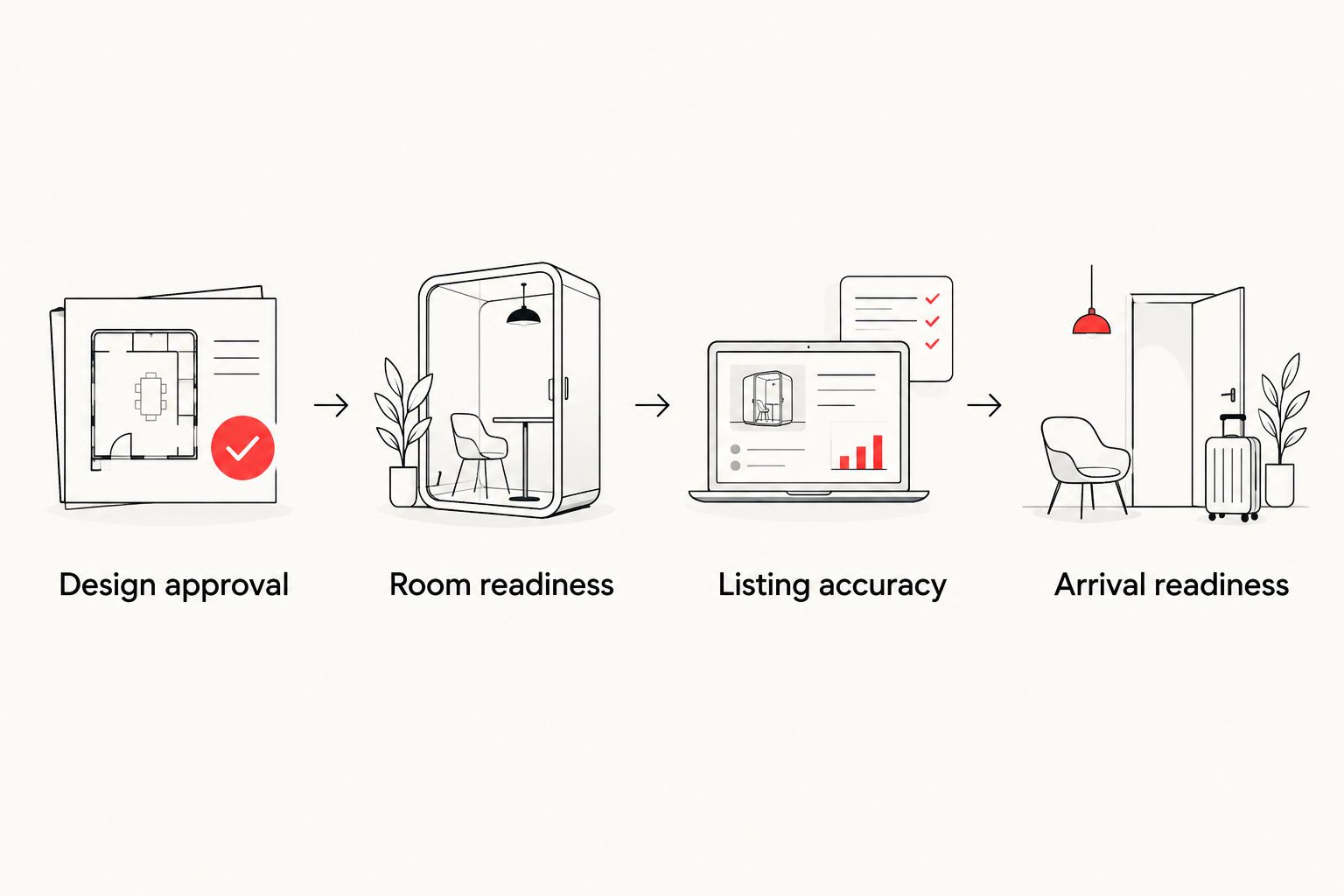
Room readiness comes before listing approval and arrival preparation.
Test the property after cleaning
Schedule 2 walkthroughs: one after installation and one after the final cleaning reset. These are recommended checkpoints, not a claim about an industry standard.
During the second walkthrough, use only the instructions a guest will receive. Find the entrance, operate the access method, locate towels, and follow appliance instructions. A setup that works only when the owner explains it still needs work.
Record the exact problem and the responsible person. Replace vague notes such as “bedroom unfinished” with a clear action, such as moving furniture that obstructs a drawer. Retest the affected area after the correction.
Listing configuration and calendar release
Build the listing from verified facts
Photograph the installed, cleaned property—not a temporary arrangement created only for the camera. Include room relationships and limitations that guests need to understand.
Open Airbnb and select Listings. Open the relevant property and review the description, sleeping arrangements, amenities, photos, and arrival information against the approved launch brief.
Describe material limitations directly. Shared sleeping space, stairs, access constraints, and other relevant conditions should not require a guest to infer the truth from photographs.
Check each selected amenity at the property. Remove anything that is not installed, working, and intended for guest use.
Review the public-facing preview before release. Compare it with the property rather than approving the text in isolation.
Expected result: The listing describes what a guest will actually receive, including the details that influence whether the home fits the trip.
Treat the 2026 listing as an operating document. If a room changes after the photo session, update the affected images and text before accepting a reservation based on the old setup.
Release dates deliberately
Open Calendar in Airbnb and review the property's dates. Keep dates blocked until physical readiness, cleaning coverage, and arrival support are confirmed.
Check owner-use dates, maintenance work, and any existing reservations before making dates bookable. Assign one person to resolve conflicts.
If another booking channel is involved, complete the Airbnb and Vrbo calendar connection workflow before exposing overlapping dates. Calendar connections still require checking; do not treat setup as proof that every change has transferred.
Review the reservation settings available in your account. Choose settings that match your actual ability to prepare and support the property.
Make only the intended dates bookable, then inspect the guest-facing calendar. Confirm the result rather than relying on the edit alone.
Expected result: Guests can request or book only the dates you have intentionally released, subject to the reservation settings you selected.
First-booking handoff
A reservation is the start of delivery, not the end of setup. HomeSlice Stays provides vacation rental management and booking services; when discussing a handoff, define which tasks belong to the owner and which belong to the manager.
Review the reservation against the property's documented capacity and rules. Address questions through the booking platform before arrival.
Assign the cleaning reset and property inspection. Share the approved room setup rather than asking the team to recreate it from memory.
Prepare arrival instructions that match the actual entrance and access method. Never put sensitive access credentials in public listing content.
Confirm who receives guest questions and who handles an on-site problem. Give each responsibility a named owner.
Check the property after the final reset and before arrival. Keep a dated record of unresolved issues and communicate any material change to the guest through the appropriate channel.
Expected result: The first guest receives the property shown in the listing, with an accountable contact for questions and problems.
When a room changes after launch
Use the same workflow for an updated room, but limit the work to affected dependencies. A new rug does not automatically require a complete listing rewrite; changing a sleeping arrangement requires a closer review.
For example, adding a convertible sleeping option changes more than the room's appearance. When comparing luxury sofa beds, evaluate the opened footprint, access around the sleeping surface, bedding storage, and reset instructions—not just the closed furniture dimensions.
Best for flexible guest rooms: A convertible setup is appropriate only when it works in both modes. Its advantage is shared use of the room; its drawback is the extra conversion and cleaning work, plus any loss of privacy when the room is a common area.
For any 2026 room update:
Recheck the layout and applicable occupancy limits before changing the advertised capacity.
Test the new configuration with the cleaning lead and update the room checklist.
Replace affected photos, amenity selections, and sleeping descriptions.
Review upcoming reservations for a material mismatch between what was booked and what will be delivered.
Expected result: The updated room, listing, and guest instructions describe the same property. Do not increase the guest count merely because another sleeping surface exists.
Troubleshooting
Furniture arrives after the photo session
Fix: Keep the affected feature out of the advertised offering until installation and inspection are complete. Replace the relevant photographs once the room matches the intended guest setup; avoid leaving an obsolete image beside a contradictory description.
The room fits furniture but not guest movement
Fix: Test doors, storage, luggage placement, and the route through the room. Reduce or rearrange furniture before increasing the advertised capacity. A photograph does not establish that a layout is usable.
The cleaner cannot recreate the photographed setup
Fix: Simplify the arrangement and document where items belong. Rehearse the reset with the person doing the work; remove decorative steps that conflict with a repeatable cleaning process.
The calendar shows dates that should stay blocked
Fix: Inspect each active booking channel and confirm the intended blocks directly. Investigate the calendar connection before reopening dates, and check existing reservations for conflicts rather than assuming a corrected setting resolves earlier mismatches.
Customize your workflow
For your 2026 operating plan, separate owner approvals from recurring management tasks. Owners can approve the guest promise and room configuration; assign calendar checks, cleaning coordination, and guest communication explicitly rather than leaving them between roles.
HomeSlice Stays offers management and booking services, but your agreement should identify the actual responsibilities. The benefit of a management handoff is assigned ownership; the trade-off is that you must document approvals and exceptions instead of relying on informal arrangements.
Discuss your rental management handoff
Clarify ownership of booking, guest communication, and property-readiness tasks.
FAQ
Where should I start with Airbnb interior design in Paradise Valley, AZ?
Start with the property's permitted use, intended guest experience, and measured room layouts. Approve a written room brief before purchasing furniture or scheduling listing photography.
Should I publish my Airbnb before the interior is finished?
Keep booking dates blocked until the advertised rooms and amenities are ready. Photography and draft listing work can happen earlier, but unfinished features should not become guest promises.
Can I add a sofa bed and advertise more guests?
A sofa bed does not by itself justify a higher advertised guest count. Verify applicable occupancy limits, test the opened layout, and update the listing only when the arrangement is accurate and operationally ready.
Do I need new Airbnb photos after changing furniture?
Replace photos when a furniture change materially alters the advertised room or guest experience. Keep images, sleeping descriptions, and amenity information consistent with the property guests will receive.
What should I test before the first Airbnb guest arrives?
Test arrival access, the cleaning reset, room usability, and the advertised amenities. Follow the same instructions the guest receives and correct anything that requires an extra explanation.
Can HomeSlice Stays help with the management side of a launch?
HomeSlice Stays provides luxury vacation rental management and booking services for Scottsdale and surrounding areas. Confirm the specific responsibilities for your property, including any separately arranged design or installation work.
One last thing
Run the final walkthrough without giving verbal instructions. Hand someone the arrival information and let that person find the entrance, locate essentials, and use the rooms. Every moment that requires your explanation identifies something to fix before the first guest arrives.
Related guides
More Blogs