How to connect Airbnb and Vrbo calendars without double bookings
Instead of manually copying reservations between Airbnb and Vrbo, set up Airbnb Vrbo calendar sync in both directions so each listing imports the other listing’s booked dates. This guide covers the connection, verification, and the critical limitation: calendar feeds refresh periodically, so they do not guarantee protection against double bookings.
TL;DR
Airbnb Vrbo calendar sync needs reciprocal calendar imports; a single connection leaves one booking channel unprotected.
Airbnb and Vrbo iCal feeds exchange calendar events, not a complete set of listing settings.
Verify blocked nights in both calendars before relying on the connection.
HomeSlice Stays suits Scottsdale owners seeking vacation rental management rather than calendar setup alone.
Why this matters
A reservation on Airbnb does not automatically close the same dates on Vrbo until you connect the calendars and the receiving platform imports the event. That creates two separate risks: an incomplete connection and a delay between updates. Fixing the first does not eliminate the second.
For your 2026 setup, treat calendar sync as an availability aid—not a real-time booking lock. Owners who want broader operational support can explore HomeSlice Stays, which provides luxury vacation rental property management and booking services in Scottsdale and surrounding areas.
HomeSlice Stays is best for Scottsdale owners seeking vacation rental management rather than calendar setup alone. The service covers a broader need, but choosing management does not replace checking how your particular listings exchange availability.
Before you start
Get calendar-editing access to both listings. Use the Airbnb host account and Vrbo owner account for the same physical property. Confirm that you can edit availability, not just view reservations.
Prepare a private connection record. Record the property name, both listing identifiers, the source of each feed, and who owns the setup. Treat export links as sensitive because anyone holding a link can access the calendar information it exposes.
Check for an existing software connection first. If a property management system or channel manager already controls availability, follow that system’s connection instructions. Adding parallel iCal imports can create duplicate blocks and make their source harder to identify.
Keep both calendars open in separate browser tabs. Before changing anything, compare existing reservations, owner stays, and maintenance blocks so you have a baseline for your checks.
Choose the right connection method
Airbnb and Vrbo are booking channels; iCal is the calendar-feed format used to move availability events between them. A channel manager is a different approach: it connects supported booking channels through software integrations.
Reciprocal iCal imports
Best for: Owners managing a straightforward calendar connection themselves
Advantage: Each platform can import events from the other
Limitation: Updates are periodic, and the feed does not carry every listing setting
Supported channel-manager connection
Best for: Owners centralizing availability across booking channels
Advantage: Centralizes distribution through supported integrations
Limitation: Requires compatible connections, correct listing mapping, and ongoing monitoring
Manual calendar updates
Best for: Temporary handling of a known booking or owner block
Advantage: Lets you close dates directly while resolving a connection problem
Limitation: Depends on someone updating every affected calendar
Use reciprocal iCal imports only when you understand and can manage the refresh gap. If a channel manager already controls the property, do not rebuild that connection with independent feeds without checking its instructions.
For a 2026 calendar review, assess the connection method and the person responsible for monitoring it. Software does not resolve an unclear handoff between an owner and a manager.
Airbnb export and Vrbo import
This first configuration sends Airbnb calendar events to Vrbo. It does not yet send Vrbo reservations back to Airbnb.
Export Airbnb. In Airbnb’s host view, open Calendar, select the correct listing, and open Availability. Find Connect calendars, then Connect to another website.
Copy the Airbnb calendar export link. Copy the feed link itself, not the browser address of your calendar page. Keep the link unchanged.
Import into Vrbo. In the Vrbo owner dashboard, select the matching property and open Calendar. Use Import & export, then Import calendar.
Paste the Airbnb export link into the calendar URL field. Give the imported calendar a descriptive name that identifies Airbnb and the property, then complete the import.
Inspect an existing Airbnb reservation in Vrbo after the imported calendar updates. Check the actual unavailable nights rather than relying only on the event name.
Expected result: Airbnb reservation dates appear as imported calendar blocks in the matching Vrbo property. If there is no Airbnb reservation to inspect, use the controlled verification process below instead of assuming the connection works.
Vrbo export and Airbnb import
The second configuration closes the loop. Without it, a Vrbo booking has no calendar-feed route back to Airbnb.
Export Vrbo. Open the correct property’s Calendar, then Import & export and Export calendar. Copy the Vrbo calendar export link.
Review any export option concerning imported calendar events. Avoid unnecessarily sending Airbnb-originated events back to Airbnb through Vrbo; identify the source before enabling an option that includes imported events.
Import into Airbnb. Return to the matching Airbnb listing’s Calendar, open Availability, then Connect calendars and Connect to another website.
Paste the Vrbo export link into Airbnb’s import section. Enter a name that identifies Vrbo and the property, then select Add calendar.
Check a Vrbo reservation against Airbnb’s imported blocks after the feed updates. Match arrival, departure, and the occupied nights.
Expected result: Vrbo reservations block their corresponding nights on Airbnb, while Airbnb reservations block their corresponding nights on Vrbo.
These desktop navigation labels describe the calendar connection workflow; account layouts can differ. If your property is software-connected and the import controls are unavailable, use the connected system’s instructions rather than changing unrelated settings.
Calendar verification and handoff
A saved feed URL is not proof that your Airbnb Vrbo calendar sync works. Verification requires seeing the right dates blocked on the receiving platform.
Check 2 directions for 1 property: Airbnb to Vrbo, then Vrbo to Airbnb. Record the source event and the receiving calendar’s result separately.
Use existing reservations where possible. For example, a stay from June 10 to June 13, 2026 occupies 3 nights: June 10, 11, and 12. Check the occupied nights, not just the displayed departure date.
If you need a test block, choose dates you can safely close and label the block clearly. Confirm whether that type of manual block is included in the source platform’s export; do not assume every availability restriction travels.
After the receiving calendar updates, inspect the event source. A date that was already manually blocked is not proof that the import succeeded.
Remove any temporary test block at its source, then verify its removal downstream. Do not create a paid reservation just to test a feed.
Expected result: You have confirmed both incoming blocks and the removal of a temporary exported block. Keep a record of who checked the connection and when.
The complete connection has four parts: Export Airbnb, Import into Vrbo, Export Vrbo, and Import into Airbnb. Missing any part leaves the workflow incomplete.
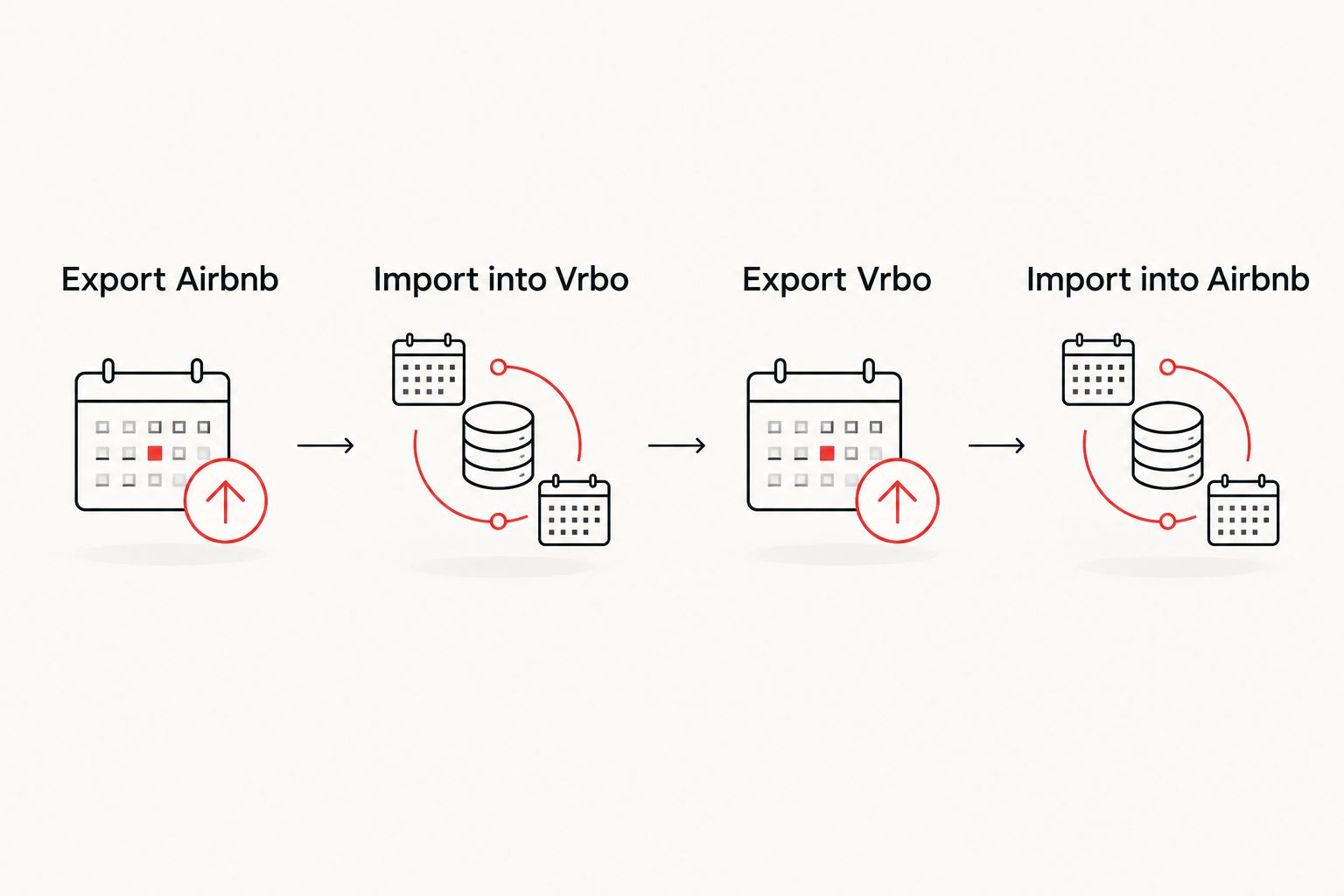
Both exports need a matching import on the other booking channel.
When a reservation changes or gets canceled
An existing iCal connection also provides a route for reservation changes and cancellations to reach the other platform. The receiving calendar still has to refresh before it reflects the source update.
Start with the reservation’s originating platform. Confirm that the new dates or cancellation are actually saved there, then inspect the receiving calendar after its next update or an available manual refresh.
For changed dates: Check that the new occupied nights are blocked and the former nights no longer carry the outdated imported event.
For cancellations: Check that the imported reservation event disappears. The dates can remain unavailable for another reason, such as an owner block or booking restriction.
For owner stays: Enter the stay in the calendar that controls your workflow, then verify that this kind of block exports. If it does not, close the dates separately wherever needed.
Do not delete and recreate the calendar connection for every reservation change. First identify whether the source event changed, whether the receiver refreshed, and whether another block remains.
For your 2026 operating checklist, assign one person to confirm downstream changes after cancellations and date modifications. A notification in one booking channel is not confirmation that the other calendar has updated.
Troubleshooting calendar sync problems
Airbnb dates appear on Vrbo, but Vrbo dates stay open on Airbnb
The connection is likely incomplete. Check that Airbnb contains an imported Vrbo feed—not merely an Airbnb export link copied into Vrbo.
Confirm both source-and-destination pairs in your connection record. Then inspect a Vrbo-originated reservation on Airbnb after the import updates.
A new booking has not blocked the other calendar
Periodic refresh creates a gap between a source booking and the receiving calendar’s update. Confirm the booking exists at its source and that the receiving listing has the correct feed.
Use a manual refresh control if the receiving platform provides one. If you need to protect the dates immediately, close them directly on the other channel and record the temporary block so it does not remain after the imported event takes over.
The platform rejects the calendar link
Check that you copied an export-feed URL rather than a dashboard address or a downloaded calendar file’s local location. Remove accidental spaces without changing the link itself.
Copy a fresh export link from the correct listing and try the import again. Keep feed links out of public messages and screenshots.
A canceled booking still appears unavailable
Check the source reservation first, then inspect the receiving calendar’s event source. A stale imported event, a separate manual block, and an availability rule require different fixes.
Wait for or request an available refresh before removing a valid connection. Delete only a manual block you can identify and confirm is no longer needed.
The same dates show duplicate blocks
Review every imported calendar and any connected management software. Duplicate feeds or a manual block layered over an imported reservation can explain overlapping entries.
Identify the authoritative source before removing anything. Removing a calendar import can remove its protective blocks, so compare active reservations before changing the setup.
Customize your workflow
A working feed is only part of vacation rental management. Build a process for owner visits, maintenance closures, cancellations, and the person who responds when calendars disagree.
HomeSlice Stays provides vacation rental management for homeowners in Scottsdale and surrounding areas. That broader service is relevant when you want to delegate property operations rather than maintain calendar connections yourself; confirm the proposed calendar workflow during your management discussions.
Before delegating, ask:
Which system controls availability for this property?
Who checks failed imports and disconnected channels?
How are owner stays and maintenance closures entered?
Who removes temporary manual blocks after an issue is resolved?
What happens when a reservation changes outside normal working hours?
Owners managing a seasonal residence can use the vacation rental management guide for snowbird homeowners to frame the wider handoff.
For 2026, write down the source of truth before adding more booking channels. More connections without clear ownership make troubleshooting harder.
FAQ
How do I set up Airbnb Vrbo calendar sync?
Export the Airbnb calendar and import its feed into Vrbo, then export the Vrbo calendar and import its feed into Airbnb. Verify reservations in both directions; completing only one import leaves the reverse direction unconnected.
Does syncing Airbnb and Vrbo prevent all double bookings?
No. Calendar feeds refresh periodically, so a booking can occur before the other platform imports the updated availability. Monitor the connection and consider a supported channel-manager integration when you need centralized distribution.
How often do Airbnb and Vrbo calendars sync?
The receiving platform controls its calendar refresh schedule; iCal is not a continuous real-time connection. Check the refresh information shown in your current account and verify the imported event rather than assuming immediate delivery.
Does Airbnb Vrbo calendar sync copy rates and minimum stays?
No, an iCal connection is not a full listing-settings sync. Manage rates, minimum stays, fees, and other booking rules separately unless a supported software connection explicitly handles them.
Can I sync an owner stay between Airbnb and Vrbo?
You can share an owner stay if the source platform includes that type of calendar block in its export. Test the block on the receiving calendar; if it does not transfer, close the dates separately on each affected channel.
Why are my dates still blocked after a cancellation?
The receiving calendar may not have refreshed, or another block or availability rule still applies. Check the canceled reservation at its source, inspect the remaining block’s origin, and remove only restrictions you can confirm are no longer needed.
Should I use iCal if a channel manager already connects my listings?
Follow your channel manager’s connection instructions instead of adding independent feeds by default. Parallel connections can create duplicate blocks and obscure which system controls availability.
One last thing
Test a block’s removal, not just its arrival. A calendar connection that closes nights but leaves obsolete restrictions behind is still an operational problem.
Make removal verification part of your 2026 calendar checklist. With HomeSlice Stays or any management arrangement, assign responsibility for checking the receiving calendar—not merely sending the update.
Related guides
More Blogs