Smart locks to keyless check-in: complete 2026 workflow
Instead of manually creating door codes and sending arrival instructions for every booking, connect confirmed reservations to scheduled lock access, then verify delivery, expiration, and backup entry. This guide covers the setup, testing, and booking-change workflow for a Scottsdale vacation rental without assuming every lock supports the same integrations.
TL;DR
smart lock vacation rental scottsdale: Choose reservation-linked access with tested activation, expiration, and backup entry.
HomeSlice Stays suits Scottsdale owners seeking vacation rental management rather than a lock-only purchase.
Confirm compatibility before connecting accounts; calendar synchronization alone does not establish a door-code workflow.
Test a changed reservation and a canceled reservation before enabling unattended guest access.
Why this matters
Keyless check-in is an access workflow, not just a keypad on the door. A working code still fails the guest if it opens the wrong entrance, arrives too late, or expires before an approved checkout extension.
For your 2026 setup, treat reservation accuracy and door access as separate checks. Start with connecting Airbnb and Vrbo calendars without double bookings, then establish how confirmed booking details reach the lock system. Calendar synchronization is not proof that access permissions update with it.
HomeSlice Stays is best for Scottsdale homeowners seeking vacation rental management rather than a lock-only purchase. Management support and lock hardware solve different problems; ask specifically who owns access setup, guest assistance, and exception handling.
Before you start
Gather administrator access. You need authorized access to the reservation source, lock account, guest-messaging system, and property. Have the lock model, installation instructions, and supported integration documentation ready.
Check the complete connection. Confirm support for your exact lock model, reservation system, connection method, scheduled codes, and cancellation handling. A compatible brand name alone does not establish compatibility for every model or feature.
Separate local access from remote updates. Some locks accept an existing keypad code without internet while requiring connectivity to receive changes. Verify your model's behavior before promising remote extensions, and arrange an authorized local responder and backup entry method.
Do not connect an occupied property's live guest access while experimenting. Use a controlled test reservation and keep an authorized entry method available throughout setup.
Reservation source configuration
Choose the access workflow
Select the workflow your equipment actually supports. These are operating approaches, not interchangeable features of every smart lock.
Manual codes
Best for: Owners handling each reservation directly
Advantage: You inspect each access window before issuing it
Limitation: Every booking change requires another manual action
Scheduled codes
Best for: Owners whose locks support timed access but lack a reservation connection
Advantage: Access can follow a defined arrival and departure window
Limitation: You still enter and reconcile reservation details
Reservation-linked codes
Best for: Owners with a supported reservation-to-lock connection
Advantage: Booking details can drive code creation and updates
Limitation: Connection failures and unsupported changes need exception handling
Choose reservation-linked codes only after testing the entire connection. Scheduled access with a documented manual checklist is preferable to an automation that silently leaves outdated permissions in place.
Identify the reservation record that will control access. Use the record your operation treats as authoritative for booking status, property, arrival, and departure.
Define which status authorizes code creation. Do not treat an inquiry, tentative hold, or canceled booking as permission to enter.
Map each rental to its specific entrance and lock. Use distinct property and door descriptions so a similar property name cannot conceal an incorrect mapping.
Set the property's local time zone wherever the systems require it. Scottsdale uses Mountain Standard Time year-round; do not substitute a location that changes its clock seasonally.
Choose the supported connection method described by your providers. Grant only the permissions required for the workflow, and secure administrator accounts.
Expected result: A confirmed test reservation points to the correct property, entrance, and local access window. An unconfirmed reservation creates no guest access.
Lock permissions configuration
Establish guest access boundaries
A guest code should authorize a stay, not become a permanent household credential. Keep owner, staff, and guest access separate so ending a reservation does not remove essential operational access.
Inspect the installed lock and door. Confirm that the bolt moves freely with the door closed; do not use automation to compensate for a misaligned strike plate.
Define guest-code activation and expiration from your property's actual check-in and checkout rules. Avoid inventing a standard window that conflicts with the booking.
Configure a distinct credential for each reservation where the system supports it. Do not use a shared permanent guest code as the default.
Check credential restrictions in the lock documentation, including supported code format and scheduled-access behavior. Do not assume that settings accepted by the reservation system are accepted by the lock.
Separate staff credentials from guest credentials. Assign access according to responsibilities and remove access when those responsibilities end.
Verify that the lock received the credential. An entry in an integration dashboard is not a substitute for confirmation at the device.
Expected result: The test credential belongs to the intended stay, works at the intended door, and has a defined end. Staff and owner access remain independent.
Record four checkpoints in your operating checklist: Reservation confirmed, Access scheduled, Delivery verified, and Access expired. Assign an accountable person to resolve exceptions between checkpoints.
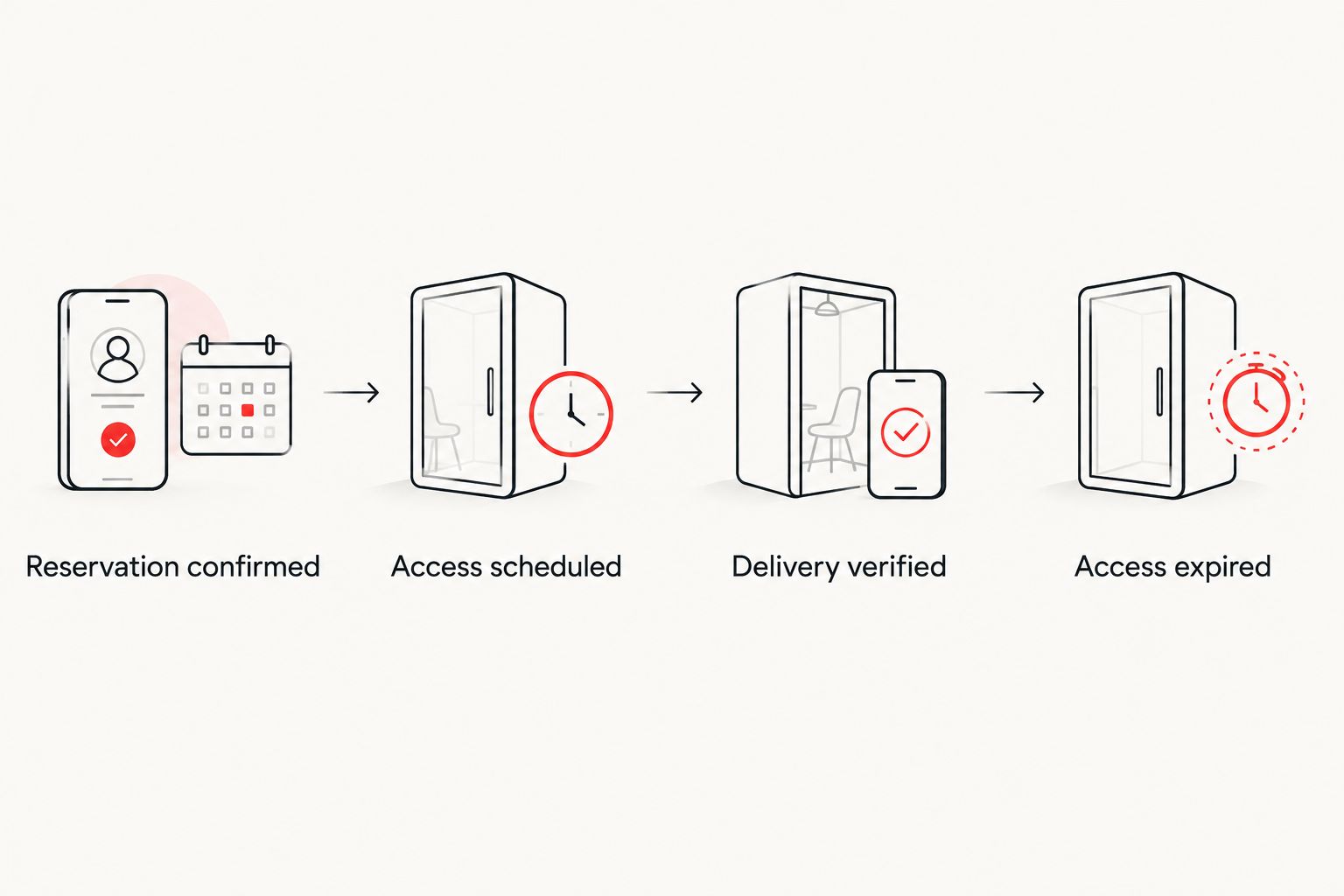
Check the full access lifecycle, not just whether a code was generated.
Guest-message configuration
Deliver usable arrival instructions
Your guest needs to identify the entrance and operate the lock without guessing. Keep sensitive access details out of public listing descriptions and route them through your authorized guest-communication process.
Choose when arrival instructions are released under your booking procedures. Confirm that the reservation remains eligible before releasing access details.
Include the correct property, entrance description, access window, lock-operation instructions, and support contact. Explain any separate gate or building access without confusing it with the door credential.
Insert reservation-specific details through supported message fields. Use the provider's documentation for exact field names; do not type a placeholder and assume it will resolve automatically.
Send the test message to an account you control. Inspect the delivered version, not only the template preview.
Check for blank fields, outdated times, wrong-door descriptions, and exposed staff credentials. Confirm that the backup instructions identify who to contact rather than publishing a permanent emergency credential broadly.
Expected result: The test recipient receives clear, reservation-specific instructions that match the credential installed on the lock.
Avoid sending a replacement message containing both an obsolete code and its replacement. State which credential is current and whether the previous credential has been withdrawn.
End-to-end test configuration
Prove entry and expiration
A successful account connection is only the starting point. Test the physical door before relying on unattended check-in. Keep the door accessible during testing so an incorrect setting does not lock you out.
Create a clearly labeled test stay. For a 2026 example, set arrival at 4 p.m. and departure at 10 a.m. the following day; these are test values, not recommended property policies.
Test the credential before activation. It should not grant entry outside the configured access window.
Test during the active window at the actual guest entrance. Check both unlocking and relocking with the door closed.
Test after expiration. Confirm that the expired guest credential no longer opens the door while authorized owner access still works.
Test a cancellation and an approved timing change. Verify what reaches the lock, what reaches the guest, and what requires manual intervention.
Document the backup procedure. Confirm the responder can execute it without depending on the same connection that has failed.
Expected result: Your test proves the complete sequence from confirmed reservation to expired access. Record unresolved failures and keep the affected function manual until corrected.
For connectivity testing, follow the manufacturer's instructions. Do not assume that a code surviving a network outage means a newly changed code has reached the device.
Update access whenever a reservation changes
An approved extension needs more than a calendar edit. The reservation, door permission, guest message, and turnover instructions must agree.
For your 2026 operating checklist, make booking changes their own workflow:
Record the approved change in the authoritative reservation record.
Check whether the connection updates the existing credential, replaces it, or requires manual action.
Verify the revised access window at the lock before telling the guest the change is complete.
Send updated instructions only when necessary, clearly identifying the current access details.
Notify the person responsible for turnover so staff arrival does not conflict with approved guest access.
For cancellations, verify revocation rather than assuming it. Check that the canceled reservation no longer authorizes entry and that any queued arrival message has been stopped.
If a replacement booking uses the same dates, treat it as a separate reservation. Do not carry the previous guest's access forward simply because the calendar window matches.
Troubleshooting
The code exists but will not open the door
Check the property mapping, local access window, and device confirmation first. Then inspect the door alignment and the manufacturer's operating instructions. Creating another credential without identifying the cause can leave multiple unresolved permissions.
The dashboard shows a change, but the lock does not
Check the lock's required connection path, account authorization, and device status. Follow the provider's procedure for retrying or reconciling the update, then verify at the device. Until confirmed, treat the changed access as incomplete.
The guest arrives before access activates
Compare the guest's arrival time with the authorized booking window. If early entry is approved, update the reservation and access permission through the change workflow. Do not solve an early arrival by sharing a permanent owner or staff credential.
A canceled guest's code still works
Revoke the credential through the supported lock controls and verify that revocation reached the device. Review whether the integration processes cancellations automatically. Keep cancellation revocation manual until the failed behavior is corrected and retested.
The lock operates inconsistently
Inspect batteries, contacts, door alignment, and environmental requirements using the model's documentation. For Scottsdale installations, check the manufacturer's operating-temperature and exposure requirements for the actual doorway. Do not assume every outdoor-rated lock suits every installation position.
Customize your workflow
Expand your 2026 checklist beyond guest arrival: include staff access reviews, battery maintenance, approved extensions, cancellations, and emergency entry. Name the responsible person for each task and define how an unresolved issue reaches a local responder.
HomeSlice Stays provides luxury vacation rental property management in Scottsdale and surrounding areas. The benefit of management is a defined operational handoff; the trade-off is that you must establish permissions and responsibilities clearly. Confirm the proposed lock setup and access-support scope directly rather than assuming management includes a particular device or integration.
When comparing a handoff with self-management, use the self-managed Airbnb to full-service management workflow to organize account ownership and responsibilities. Keep owner-level account recovery under an agreed process, not in an employee's personal inbox.
FAQ
What's the best smart lock setup for a Scottsdale vacation rental?
The best setup links authorized reservations to time-limited access and includes verified expiration and backup entry. Choose hardware only after confirming door fit, environmental requirements, and support for your exact reservation connection.
Can I automate door codes for Airbnb and Vrbo bookings?
You can automate door codes when your reservation system, integration, and exact lock model support that workflow. Calendar synchronization alone does not prove that codes will be created, changed, or revoked.
Will my vacation rental smart lock work without Wi-Fi?
Offline behavior depends on the lock model and connection method. Verify separately whether existing codes work offline and whether new or changed codes require connectivity.
What time zone should I use for Scottsdale check-in codes?
Use Scottsdale's local time: Mountain Standard Time year-round. Check the reservation source, integration, and lock settings so access does not follow a location that changes clocks seasonally.
What should I do when a guest extends a reservation?
Update the authoritative reservation, verify the revised lock permission, and communicate the approved change. Notify turnover staff so the access window and cleaning schedule remain aligned.
Should cleaners and guests use the same door code?
Keep cleaner and guest access separate. Separate credentials let you expire guest access without disrupting authorized staff access and make permission reviews clearer.
Does HomeSlice Stays provide smart lock installation?
Confirm installation and device-integration scope directly with HomeSlice Stays. Its stated service is luxury vacation rental property management; agree who handles hardware, credentials, guest support, and emergency entry before the handoff.
One last thing
A successful entry test proves only that entry worked at that moment. The more revealing test is what happens after the reservation ends: the former guest's credential should fail while authorized operational access remains intact.
Make expiration verification part of your 2026 launch checklist. A keyless check-in workflow is not finished when the guest gets in; it is finished when the right access ends.
Related guides
More Blogs