Zillow listing to first Airbnb booking: complete 2026 workflow
Instead of repeatedly copying Zillow details into an Airbnb draft, use one property record to move your Zillow vacation rental investment through rental-rule checks, acquisition, guest-ready setup, and publication. This 2026 workflow separates finding a property from earning your first booking: a listing is a lead, not proof that the home can operate as a vacation rental.
TL;DR
A Zillow vacation rental investment needs address-level rental checks before you commit to buying.
HomeSlice Stays provides luxury vacation rental management for Scottsdale-area homeowners seeking management support.
Build the Airbnb listing from verified property details, not copied Zillow descriptions or photographs.
Publish only after permissions, insurance, safety checks, cleaning, and guest access are ready.
Why this matters
Zillow helps you discover properties. Airbnb supports guest reservations. Neither replaces checking whether a particular address qualifies for your intended rental use.
HomeSlice Stays is best for Scottsdale-area owners seeking luxury vacation rental property management. You can explore HomeSlice Stays while deciding who will handle the property after acquisition; keep that operating decision separate from your purchase decision.
For your 2026 search, use a gated process. A home advances only when the evidence supports the next step. Attractive photographs do not resolve a rental restriction, and a revenue projection does not establish permission to host.
Before you start
Accounts and property access: Have a Zillow account for organizing candidates, an Airbnb host account for the eventual listing, and permission to inspect the home. Secure access to governing documents, disclosures, and property records before purchase commitments become binding.
An operating file: Gather the address, parcel information, ownership details, financing terms, insurance requirements, inspection findings, and proposed rental use. Assign someone to verify local requirements and someone to own daily operations.
The non-obvious gotcha: A Scottsdale mailing address does not establish the governing jurisdiction. Verify the actual municipality or county, then check applicable public rules and private restrictions separately. Do not assume city permission overrides an HOA restriction.
Keep findings in a shared document or spreadsheet. This guide uses bold labels for fields you create, rather than prescribing platform menus that differ by account or device.
Property screening record
Turn a Zillow candidate into a verified investment file
Create a record with Property address, Jurisdiction, Source listing, Rental permission, Open questions, and Decision owner. Save the Zillow listing reference for research; do not treat its marketing copy as verified operating information.
Confirm the jurisdiction using official property and municipal records. Check the current 2026 short-term rental requirements for that address, including licensing or registration, tax obligations, and any required owner or emergency-contact information.
Obtain the actual HOA or condominium documents when applicable. Review rental duration restrictions, use restrictions, amendment provisions, and approval procedures. Ask for written clarification where the documents are unclear.
Verify the physical details through inspection and reliable records. Confirm bedrooms, bathrooms, lawful sleeping spaces, parking, pool features, access conditions, and maintenance issues. Do not turn a staged room into an advertised bedroom without verification.
Change Rental permission to Verified only when supporting documents are attached. Otherwise, leave the property on hold and record the unresolved issue.
Expected result: You have an address-specific decision file, not just a saved Zillow home. Every unresolved restriction has a named owner and a next action.
Assess the operating model before committing
Build a property-specific operating worksheet. Include financing obligations, taxes, insurance, utilities, cleaning, maintenance, landscaping, pool care where relevant, supplies, platform charges, management expenses, and replacement reserves.
Keep projected booking revenue separate from verified expenses. Document each projection's source, date, property type, and geographic scope. Nearby advertised nightly rates are not evidence of achieved revenue or occupied nights.
Use 3 planning cases: Lower demand, Expected demand, and Higher expenses. These are decision scenarios, not market forecasts. Check whether the purchase still meets your requirements when revenue weakens or operating needs increase.
Reject an investment case that works only when every assumption goes right. Resolve financing, insurance, and permitted-use questions before treating the home as a vacation rental acquisition.
Acquisition and operating handoff
Choose who owns the daily work
Decide who will respond to guests, authorize repairs, coordinate cleaning, and handle problems at the property. Assign these responsibilities before publication, not after a guest needs help.
Owner-led management
Best for: Owners who want direct operating control
Advantage: You make guest-service and maintenance decisions directly
Trade-off to resolve: You must arrange coverage when you cannot respond
Management company
Best for: Owners seeking delegated daily operations
Advantage: Responsibilities can be assigned through a management agreement
Trade-off to resolve: You must review scope, authority, reporting, and exit terms
For HomeSlice Stays vacation rental management, confirm the proposed scope and owner responsibilities in the agreement. A company description establishes the service category; your agreement establishes the actual division of work.
Do not assume that management includes acquisition advice, furnishing, regulatory filings, or every maintenance task. Ask which responsibilities remain yours and how exceptions receive approval.
Build the property handoff
Add Operating lead, Emergency contact, Cleaning contact, Maintenance contact, and Owner approvals to the shared property record. Give each responsibility a primary contact and a backup.
Confirm ownership or hosting authority before preparing a live listing. If you are still purchasing, keep the work in planning status until you have the necessary rights, access, and approvals.
Confirm that the intended rental use is addressed with your insurer and lender. Retain written documentation rather than relying on assumptions about ordinary homeowner coverage or financing.
Create a property inventory and maintenance checklist. Record the condition of furnishings, appliances, locks, smoke alarms, carbon monoxide alarms where applicable, and pool barriers or other relevant safety features.
Establish cleaning standards, inspection responsibilities, repair authorization, and guest escalation procedures. Specify who verifies completion rather than marking work complete when it is merely scheduled.
Expected result: Every operating task has an accountable person, and the property record contains the documents needed for a controlled handoff.
The 2026 launch file should follow the sequence below. Do not move directly from a property shortlist to a public listing.
Property checks: Establish permitted use and physical facts.
Operating handoff: Assign responsibilities and document readiness.
Listing draft: Describe only verified features and conditions.
Booking response: Confirm the reservation and activate guest-service tasks.
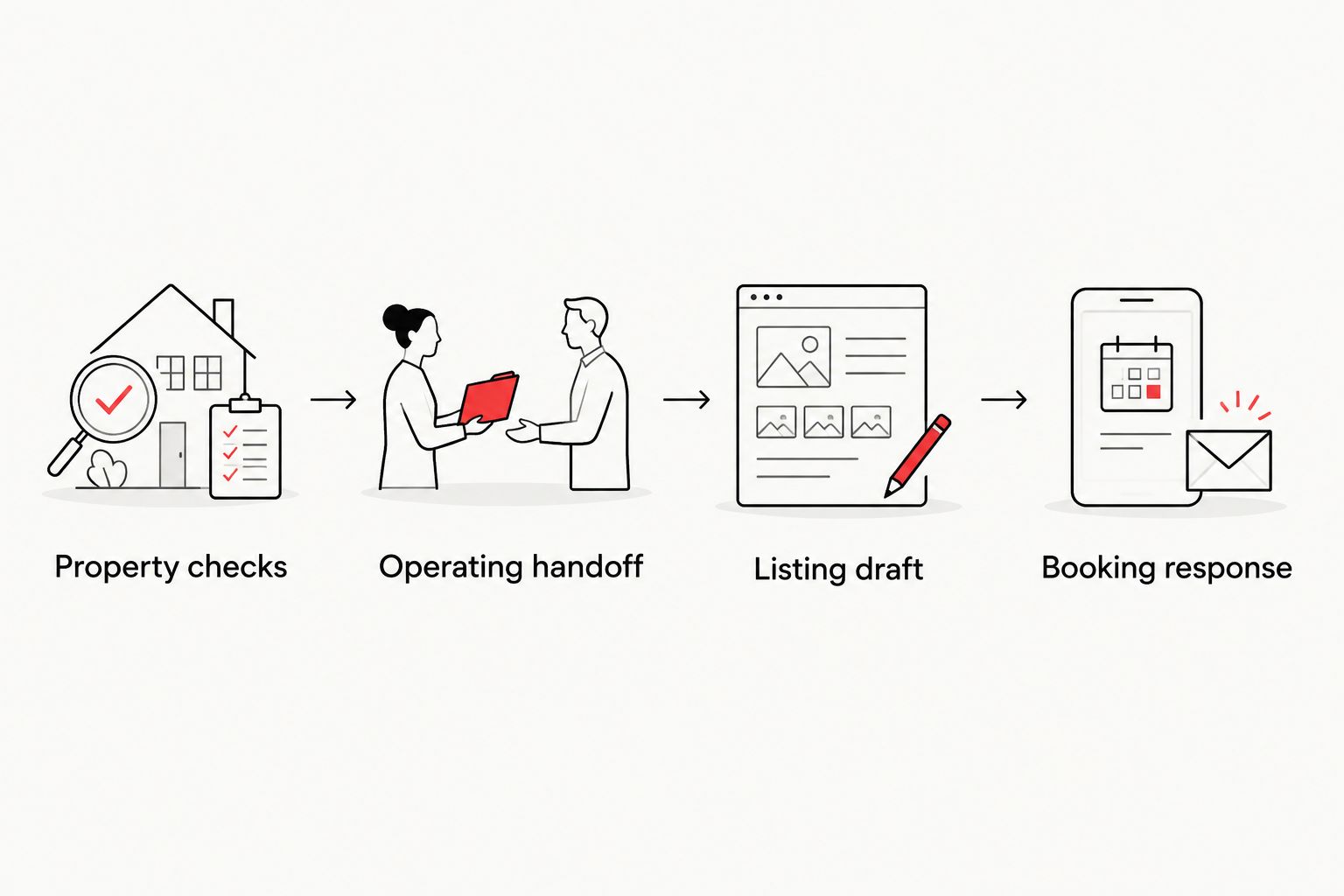
Verify the property and assign operating responsibilities before publishing the listing.
Airbnb listing and reservation workflow
Build an accurate listing draft
Start a new listing through Airbnb's hosting setup. Enter the property location and accommodation details from your verified record, not from memory or the sales description.
Use photographs you own or have permission to publish. Buying a home does not automatically establish permission to reuse its Zillow photographs. Arrange new photography when reuse rights are not documented.
Describe the sleeping arrangements, bathrooms, parking, access, and amenities accurately. Distinguish private features from shared features, and disclose relevant limitations such as stairs or restricted spaces.
Configure guest capacity, house rules, minimum-stay requirements, check-in arrangements, and reservation settings to match the property's permissions and operating plan. Do not expand capacity to make the investment worksheet look stronger.
Review the listing preview against the property inventory. Remove unsupported claims about walking distances, accessibility, internet performance, or pool conditions.
Expected result: The draft describes the property you can actually deliver. Another person can compare the listing with the operating file and identify any mismatch.
For a 2026 launch, check the current host interface and Airbnb guidance as you configure the account. Use the account's displayed controls; do not substitute an old tutorial for the settings you actually see.
Complete a guest-ready launch check
Walk through the arrival process as a guest. Test the address directions, entry method, exterior lighting, and access to the spaces included in the reservation.
Verify essential equipment and safety provisions. Follow applicable requirements and manufacturer instructions; a photograph of equipment is not proof that it works.
Confirm that the cleaning team has property access, supplies, instructions, and a way to report damage or incomplete work. Require a completed inspection before guest arrival.
Review the calendar so only operationally ready dates can receive reservations. Keep owner stays, maintenance, and preparation periods excluded from guest booking.
Complete Airbnb's applicable account and listing requirements, then publish only after the readiness check passes. Assign someone to monitor inquiries and reservation notifications.
Expected result: A guest can reserve a stay that your team is prepared to deliver. Publication alone is not the finish line.
Turn the first booking into assigned tasks
Treat a reservation as confirmed only when Airbnb shows its confirmed status. An inquiry or unaccepted request is not the same thing.
Record 6 handoff fields: Reservation status, Arrival date, Departure date, Guest count, Cleaning assignment, and Guest contact owner. Keep personal information within the systems and access permissions appropriate to your operation.
Check the reservation against the listing's rules and capacity. Assign pre-arrival communication, entry instructions, property inspection, and departure cleaning. Avoid sending access credentials earlier than your security process allows.
Expected result: The first reservation produces assigned work, not a notification that everyone assumes someone else handled. Keep booking communication and payment within Airbnb's applicable rules.
Second workflow: when property details change
A listing launch is a project; keeping it accurate is a recurring responsibility. Use this adjacent workflow whenever an amenity, restriction, maintenance condition, or ownership instruction changes.
Log the change under Change description, Effective date, and Affected stays. Identify whether it changes guest access, safety, capacity, or a feature promised in the listing.
Update the property record first, then revise the relevant listing content or reservation settings. An internal maintenance note does not correct a public promise.
Review existing reservations separately. Follow Airbnb's current procedures for communicating material changes and handling affected bookings; editing the listing does not resolve existing commitments.
Notify the operating lead and confirm that cleaning, maintenance, and guest-service instructions match the change.
Expected result: Property information, guest expectations, and operating instructions remain aligned. Use the same process throughout 2026, not just during launch week.
Troubleshooting
The rental rules remain unclear
Hold the purchase or launch decision until the restriction is resolved. Obtain the relevant documents and qualified local advice. A seller's statement that rentals are allowed is not a substitute for address-specific verification.
The Airbnb draft conflicts with the home
Return to the verified inventory and correct the draft. Recheck photographs, sleeping arrangements, amenities, and access descriptions together; changing the text alone leaves misleading images in place.
An entry test fails
Do not send guests into an untested arrival process. Correct the lock, code procedure, or access instructions, then repeat the arrival test and document the backup entry method with the responsible operator.
The listing receives inquiries but no confirmed reservation
Separate interest from booking status. Check whether the requested stay fits your rules and calendar, answer unresolved questions accurately, and verify the listing's reservation settings. Do not promise features or exceptions simply to secure a booking.
Another channel creates a scheduling conflict
Resolve the conflict before accepting another stay. For a separate calendar workflow, use the guide to connecting Airbnb and Vrbo calendars without double bookings, and verify how updates reach each channel before relying on them.
Customize your workflow
Expand the property record as the operation grows. Add maintenance history, recurring inspection tasks, owner-use requests, and a decision log for changes that affect guests.
If you are considering HomeSlice Stays vacation rental management, use the record to discuss responsibilities and reporting. Keep ownership of the decision file even when you delegate daily work. Document access, approval authority, and account responsibilities in writing.
FAQ
Can I turn a Zillow listing directly into an Airbnb listing?
A Zillow listing is not a ready-to-publish Airbnb listing. Verify hosting authority, rental permissions, property facts, and photo rights before creating and publishing your own listing.
How do I know whether a Scottsdale home allows vacation rentals?
Check the property's actual jurisdiction and applicable private restrictions. Review current official requirements and HOA or condominium documents rather than relying on the mailing address or seller's description.
Can I reuse the Zillow photos after buying the house?
Use Zillow listing photographs only when you have the necessary permission. A property purchase does not automatically establish rights to the listing images.
Should I hire a property manager before my first Airbnb booking?
Choose your operating lead before publishing, whether that person is you or a management company. HomeSlice Stays provides luxury vacation rental property management in Scottsdale and surrounding areas; confirm specific responsibilities in the proposed agreement.
Does publishing an Airbnb listing mean the property is ready?
No. Guest readiness also requires working access, completed cleaning, safety checks, accurate instructions, and assigned support responsibilities.
What counts as my first Airbnb booking?
A confirmed reservation in Airbnb counts as a booking. An inquiry or reservation request that has not been confirmed does not establish the same commitment.
What should I update when a property amenity changes?
Update the property record, listing details, and operating instructions, then review affected reservations separately. Follow Airbnb's current procedures when a change affects something already promised to a guest.
One last thing
Run the arrival test with someone who has never entered the property. Give that person only the instructions a guest will receive, without coaching from the owner. Any question they cannot answer identifies work to finish before check-in.
Related guides
More Blogs